
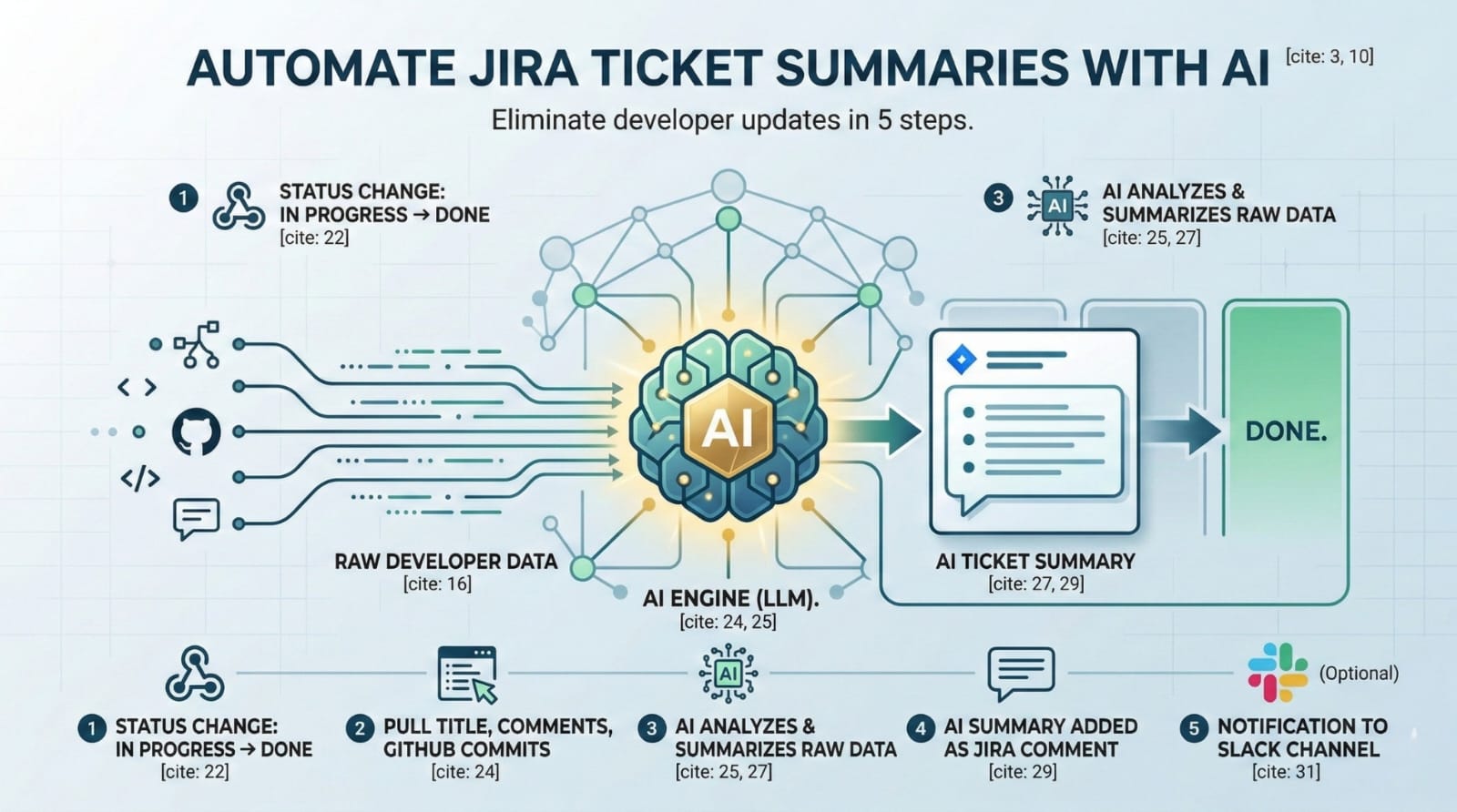
The most expensive resource in your company is engineering time. Yet, across the globe, highly paid developers spend hours every week translating GitHub pull requests into readable Jira updates for product managers.
If your sprint velocity is slowing down because of administrative overhead, it is time to automate Jira tickets with AI.
You do not need an expensive, bloated enterprise AI tool to fix this bottleneck. To successfully automate Jira tickets with AI, you just need a simple webhook, an LLM API, and about 20 minutes of setup. In this guide, we will break down a practical, 5-step workflow to eliminate manual status updates permanently.
The Required Architecture (The Stack)
Before we build the pipeline, you need to gather the right tools. To automate Jira tickets with AI, you will need the following stack:
-
A Jira Admin account: You need permission to create webhooks and automate rules.
-
An automation platform: We recommend using tools like Zapier or Make.com as the bridge.
-
An OpenAI API key: You will need to generate a key from the OpenAI Developer Platform to serve as the brain for analyzing the ticket data.
Once your accounts are ready, here is how you automate Jira tickets with AI from start to finish.
Step 1: Triggering the Webhook on “Done”
The first phase to automate Jira tickets with AI requires a trigger. The system needs to know exactly when a developer has finished their work so it can step in and take over the documentation.
Inside your automation platform (Zapier or Make), set up a trigger that listens for a specific status change in Jira. The most effective trigger is listening for when a ticket is moved from “In Progress” to “Done”. As soon as that status changes, the webhook catches the event and starts the automation pipeline.
Step 2: Extracting the Raw Developer Data
To successfully automate Jira tickets with AI, the LLM needs context. A simple status change is not enough; the AI needs to read the actual code changes and developer notes.
In your second automation step, configure the system to pull three critical pieces of information: the ticket title, the raw developer comments, and the linked GitHub commit history. When you automate Jira tickets with AI, passing this raw, unfiltered data to the API ensures the final summary is technically accurate rather than just a generic guess.
Step 3: The System Prompt (The Brains)
This is the most critical step when you automate Jira tickets with AI. The system prompt dictates exactly how the OpenAI API interprets the messy developer data and formats it for human consumption.
Copy and paste this exact prompt into your OpenAI module:
“You are a technical project manager. Take this raw developer commit data and write a 3-bullet-point summary for a non-technical stakeholder explaining what was fixed, the impact, and any next steps.”
By using this specific constraint, you automate Jira tickets with AI to produce clean, business-focused updates rather than overwhelming product managers with raw code snippets.
Step 4: Routing the AI Output
Once OpenAI processes the prompt, it will generate a clean, 3-bullet-point summary. The next step to automate Jira tickets with AI is putting that summary exactly where the stakeholders are already looking.
Add a final step in your Zapier or Make sequence that takes the AI’s response and automatically appends it as a new, formatted comment on the original Jira ticket. This creates a perfect paper trail. The developer never had to type an update, yet the Jira ticket is now perfectly documented. This is exactly why engineering managers automate Jira tickets with AI, it removes friction without sacrificing visibility.
Step 5: Slack/Discord Notification (Optional)
If you want to fully automate Jira tickets with AI and create a world-class engineering culture, you should push this data to your communication channels.
You can add a routing step to push that new, clean AI summary directly into a #product-updates Slack or Discord channel. This means that product managers and QA testers never even have to open Jira to know what was shipped.
Stop Doing Manual AI Prompts
If your team is still manually writing prompts into ChatGPT for daily workflows, you are leaking productivity. You now know how to automate Jira tickets with AI, but that is just the beginning of what is possible.
To truly scale your engineering output, you need standardized prompts across your entire organization.
