
Building an ATS friendly engineering resume is the single most important step if you are applying to top-tier technical roles and getting instantly rejected.
You just spent three relentless days building a full-stack React application to showcase in your portfolio. You optimized the database queries, perfected the responsive UI, and deployed it flawlessly. You submit your application for a mid-level frontend role, feeling confident. Then, precisely 0.4 seconds later, you receive an automated rejection email.
Why did this happen? The harsh reality is that a human being never even saw your application.
Over 75% of modern tech companies, from Silicon Valley giants to remote startups, use Applicant Tracking Systems (ATS) to filter their candidates. The current tech hiring ecosystem is a high-volume data processing environment. Recruiters are heavily bottlenecked, receiving thousands of applications for a single open position. They rely entirely on automated software to parse, score, and rank inbound applications before deciding who gets an interview.
If your document is not natively machine-readable, your underlying code and impressive GitHub repositories simply do not matter.
At Engineers Clinic, our team treats the job hunt exactly like a B2B conversion funnel. Your resume is the landing page, the recruiter is the target audience, and the Applicant Tracking System is the firewall blocking your traffic. In this comprehensive guide, we will break down exactly how to architect an ATS friendly engineering resume that effortlessly bypasses automated HR bots and secures your technical interview.
What is an ATS and Why Does it Hate Developers?
To successfully bypass a system, we must first understand the fundamental architecture of that system.
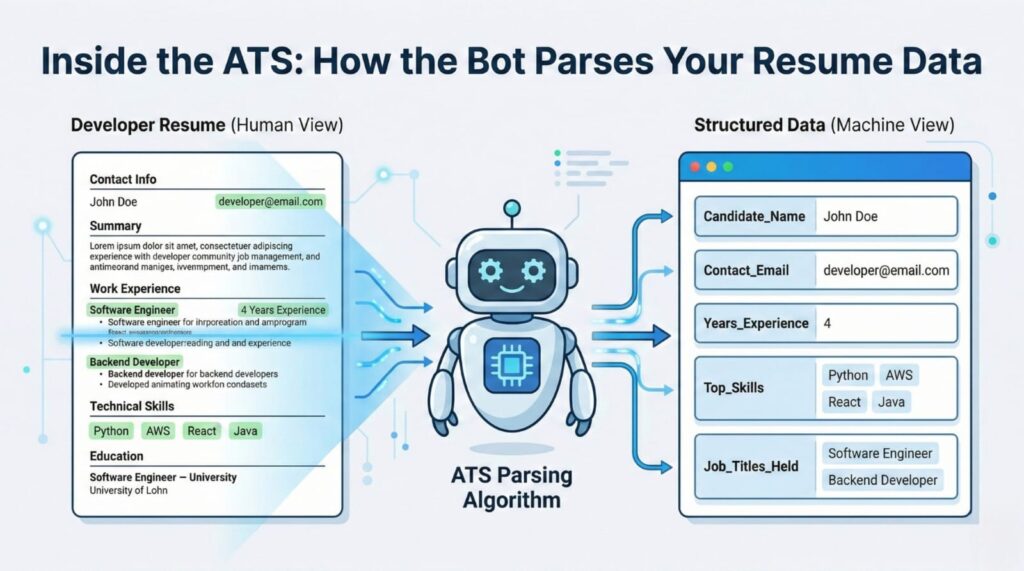
It is crucial to explain that an ATS is basically a dumb database parser. It does not possess advanced artificial intelligence, it does not appreciate your frontend design skills, and it cannot interpret visual context. Think of an Applicant Tracking System as a rudimentary ETL (Extract, Transform, Load) pipeline. When you upload a PDF or a Word document into systems like Workday, Greenhouse, Taleo, or Lever, the software initiates an extraction process.
It aggressively strips away all formatting to look for raw text, specific job titles, and keyword density (like Python, AWS, or CI/CD pipelines). It then attempts to map your raw text into its own structured internal database fields:
[First Name], [Last Name], [Experience_1_Title], [Experience_1_Dates], and [Skills_Array].
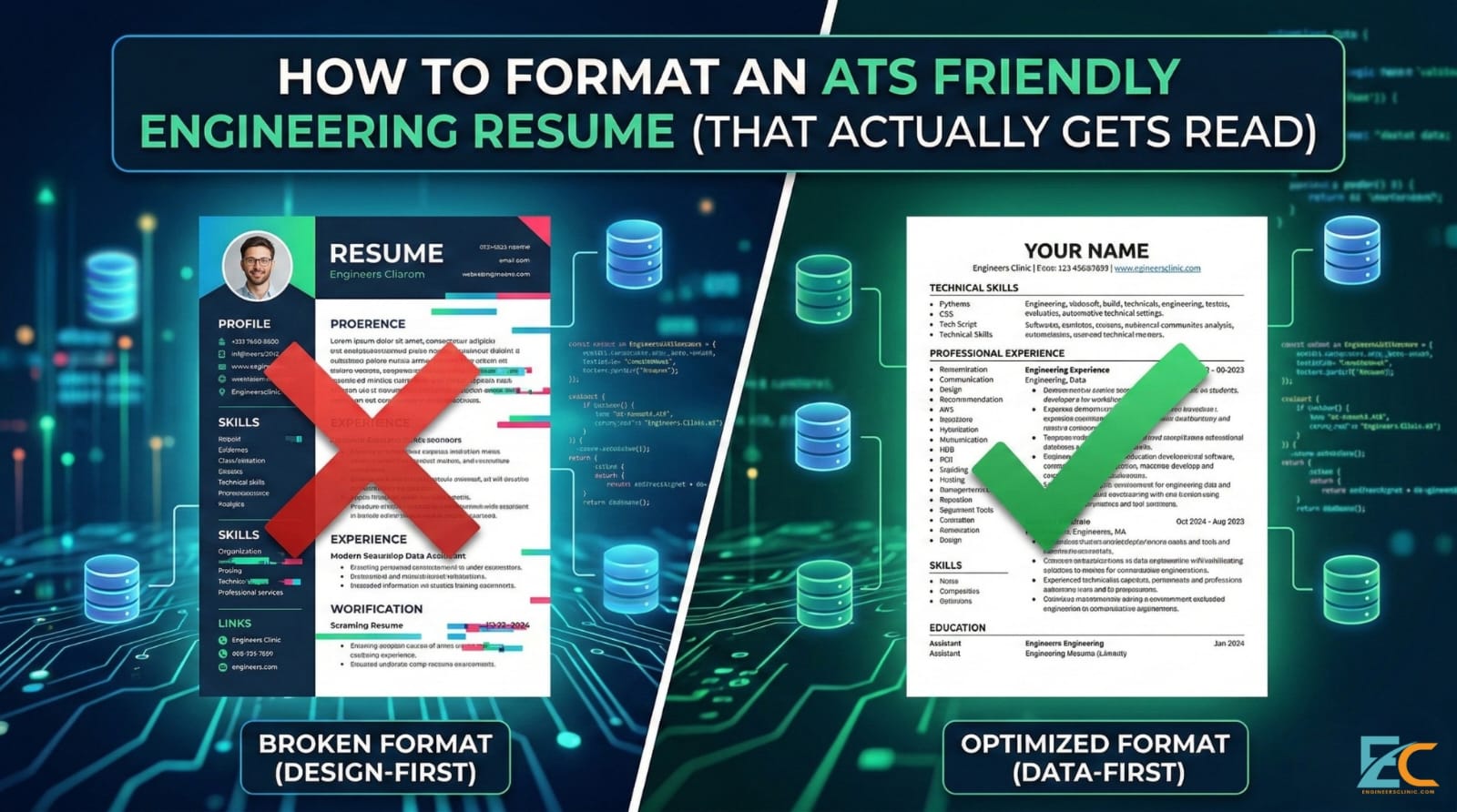
This is exactly where highly skilled developers routinely sabotage themselves. Because software engineers are builders, they often treat their resume like a UI/UX project, optimizing for visual aesthetics instead of data extraction. If a developer uses a fancy Figma template with two columns and progress bars for their skills, the parser scrambles the data and automatically rejects them.
When the parser encounters complex visual elements, the extraction fails. It cannot neatly categorize your text into its database, so it simply assumes you lack the required experience, ranking your profile at the absolute bottom of the database query. To win this game, you must submit an ATS friendly engineering resume that feeds the database exactly what it wants to consume.
The 3 Fatal Architecture Flaws Blocking Your ATS friendly engineering resume
Most engineers actively introduce friction into their own application process by utilizing templates that are fundamentally broken at the structural level. Here are the three most common architectural flaws that trigger an automatic, algorithmic rejection.
1. The Two-Column Layout
The two-column layout is the number one cause of parser failure, yet it remains incredibly popular on template sites like Canva. You must explain that ATS reads strictly left-to-right, top-to-bottom. The software does not understand vertical dividers or modular UI blocks.
When you use a modern, two-column layout, the parser simply reads straight across the horizontal plane of the page. This means columns mix the text of your “Skills” section with your “Experience” section.
Imagine the ATS reading line by line. On the left column, you have listed “JavaScript, React, Node.js”, and on the right column, you have “Senior Frontend Developer – TechCorp – 2021 to Present”. The ATS reads this as one single, corrupted string of data: “JavaScript, React, Node.js Senior Frontend Developer – TechCorp – 2021 to Present”. The system throws a parsing error, your data is corrupted, and your application is binned. An ATS friendly engineering resume never uses columns.
2. Custom Fonts & Icons
Many developers attempt to save page space by using small PNG icons for their contact information a LinkedIn logo, a GitHub cat, or a tiny email envelope. However, we must explain that GitHub or LinkedIn icons confuse the parser.
The software cannot reliably execute Optical Character Recognition (OCR) on tiny custom graphics. Instead of mapping a clean URL to your profile, the system registers a blank space, a corrupted character string, or an unknown image file. You must use standard text URLs (e.g., github.com/yourusername or linkedin.com/in/yourname). Let the data speak for itself without visual translation layers.
3. Skill “Meters” and Visual Data
If you downloaded a graphic-heavy template, it likely includes visual “progress bars”, pie charts, or “star ratings” next to your technical skills to indicate your proficiency. Saying you are “4/5 stars” in JavaScript means nothing to a search query.
An Applicant Tracking System operates as a binary search engine. When a recruiter needs to fill a role, they type “JavaScript” and “React” into the backend search bar. The system either finds the raw text “JavaScript” heavily associated with your experience, or it doesn’t. Visual meters are unparsable graphics that actively hide your core competencies from the database. If the machine cannot read the word, you do not have the skill.
How to Engineer an ATS friendly engineering resume
Now that we understand how the parser breaks, we can reverse-engineer a document that perfectly executes the data payload. Building an ATS friendly engineering resume requires strict adherence to standardization and a complete abandonment of visual ego.
Standardize the Headings (The Taxonomy)
The ATS utilizes your section headers as specific anchor points to know where to assign data in its backend. You must use exact phrases like “Professional Experience” and “Technical Skills”.
Do not use clever headings like “My Coding Journey”, “Things I’ve Built,” or “Tech Stack.” If the bot does not recognize the exact string of the header, it will not categorize the bullet points beneath it. It will essentially erase your entire work history from its memory because it doesn’t know what “My Coding Journey” means in standard HR database architecture. Keep your taxonomy rigid and traditional.
The Keyword Injection Strategy
Because the ATS is fundamentally a search engine, you must optimize your document for search queries. It is critical to explain how to tailor the “Technical Skills” section to match the exact requirements of the job description.
If the job description specifically asks for “Amazon Web Services”, do not just write “AWS” under your skills. Write “Amazon Web Services (AWS)”. If they ask for “Continuous Integration”, do not just write “CI/CD”. Write “Continuous Integration/Continuous Deployment (CI/CD)”. You must spoon-feed the algorithm the exact syntax it was programmed to find.
Furthermore, ensure your keywords are distributed naturally throughout your experience bullet points, not just stuffed into a comma-separated list at the bottom of the page. Contextual keyword density proves to both the bot and the human recruiter that you have actually utilized the required technology stack in a production environment to drive business value.
The Single-Column Rule
To guarantee your data is ingested cleanly without cross-contamination, you must eliminate all complex formatting. Stick to a 1-inch margin, standard Arial/Garamond font, black-and-white, single-column document.
It might look incredibly boring to you, but to an automated HR parser, a clean, single-column text file is a perfectly formatted, highly efficient JSON payload. Remove all invisible tables, text boxes, and complex headers or footers. Place your name, phone number, standard email address, and plain-text URLs directly in the main body text at the very top of the document. An ATS friendly engineering resume prioritizes data legibility over design aesthetics.
The XYZ Bullet Point Formula
Once your document passes the ATS filter, a human being will finally read it. However, human recruiters only spend an average of 6 seconds scanning a resume. Your bullet points must be engineered for maximum impact with minimum reading time.
Our team recommends the XYZ formula, heavily popularized by tech recruiters at Google: Accomplished [X], as measured by [Y], by doing [Z].
-
Bad: “Rewrote the backend API to make it faster.”
-
Good: “Reduced API response time by 45% (Y) by rewriting legacy REST endpoints (X) using Node.js and Redis caching (Z).”
This structure provides the human reader with immediate business value, while simultaneously providing the ATS parser with the technical keywords (Node.js, Redis, REST API) it needs to rank your profile highly.
The Fastest Way to Bypass the Filter
Rebuilding your career history into this strict architecture from scratch can be incredibly tedious. We must explain that formatting this perfectly in Word can take hours of tweaking margins and testing parsers. If you place a single invisible table in the document by accident, or use the wrong type of bullet point formatting, you risk corrupting the entire file during the upload process.
You are a software engineer. Your valuable time is much better spent building side projects, contributing to open-source repositories, and preparing for grueling technical interviews, not fighting with Microsoft Word margins and guessing how an algorithm will read your PDF.
At Engineers Clinic, we engineered a template specifically designed to pass US corporate ATS filters while looking incredibly clean to human recruiters.
Our team has stripped out all the friction and built a plug-and-play architecture to create an ATS friendly engineering resume that perfectly maps your experience to the automated databases used by top-tier global tech companies. This is not a design template; it is a data-delivery vehicle. We built the exact file structure required to ensure your text is extracted, your keywords are logged, and your profile is flagged for a human review.
Stop losing high-paying roles to candidates with inferior code but better document formatting. Deploy a system that works, bypass the algorithmic firewall, and secure your interview today.
Download the ATS friendly engineering resume Template Here ($19)
